
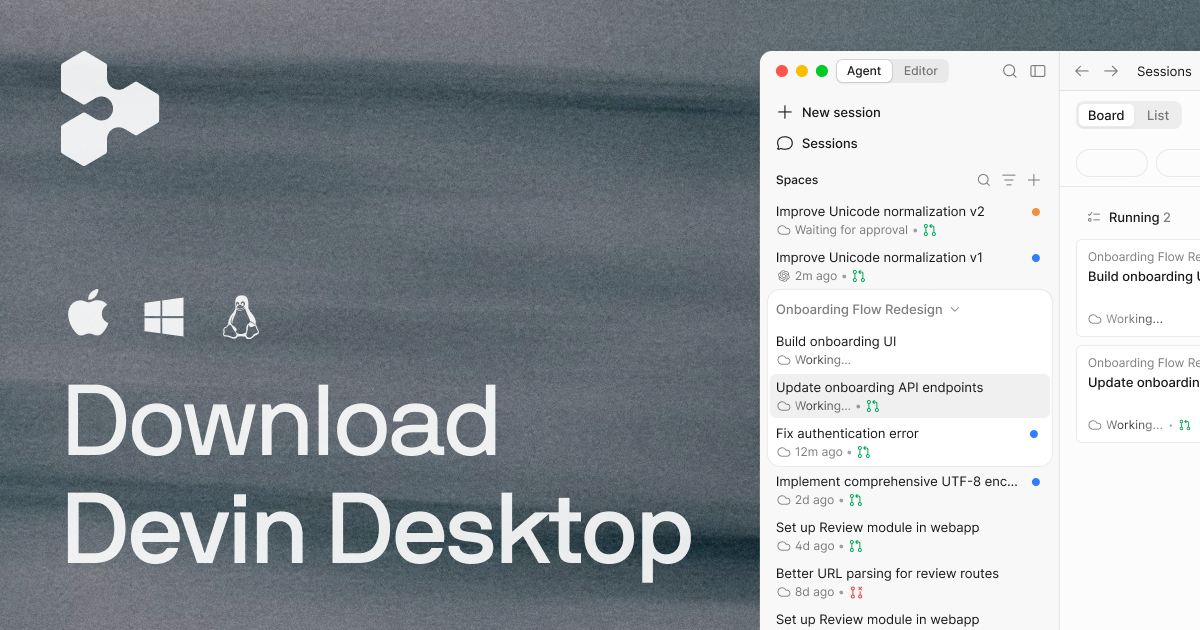
When coding agents are working in several places, the hard part becomes finding the one that needs your attention. Devin Desktop puts a code editor and an agent-management board together so you can inspect local and cloud work without treating each session as a separate project.
That makes it worth evaluating for developers coordinating multiple coding tasks. It does not remove the decisions about which agent to use, what it can access, who pays for its calls, or whether its changes should be merged. Those are the boundaries to understand before adding another agent to your workflow.
The short answer: Devin Desktop is a full code editor with a Command Center for compatible coding agents. Use it to organize sessions and review work; configure the agents, billing, permissions, and checkout isolation separately.
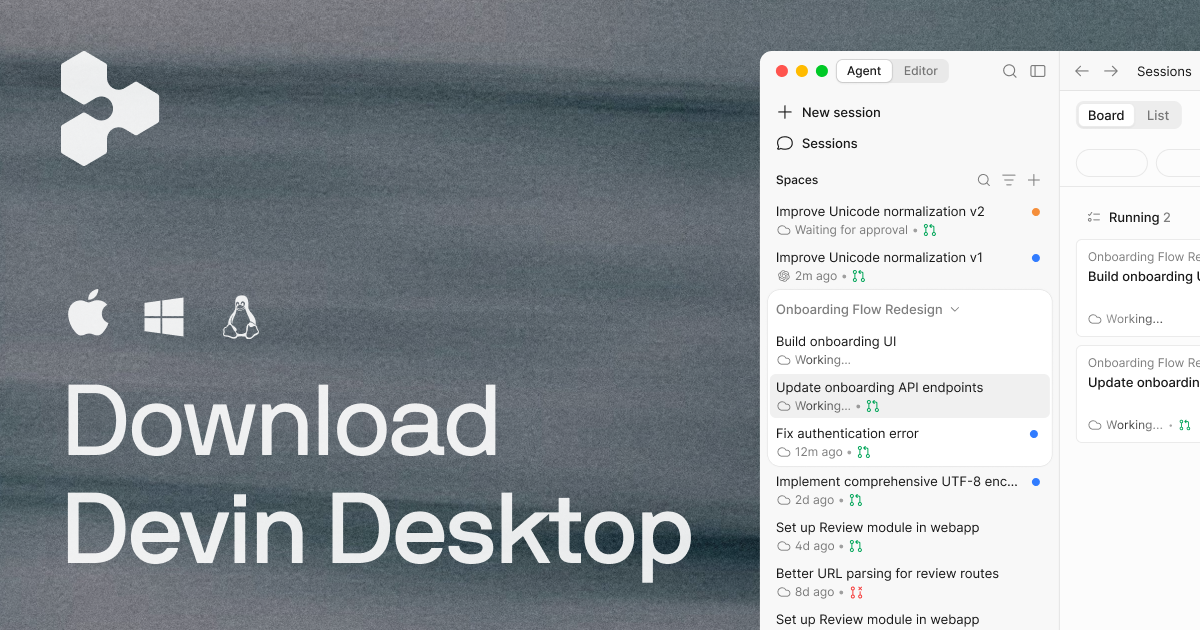
This is a documentation-based product and setup guide, not a hands-on review. I have not installed Devin Desktop or tested a migration in a real workspace. The product image above is an official Devin Desktop screenshot, not a simulated interface. Product and documentation sources were checked on September 24, 2026.
What is Devin Desktop?
Cognition describes Devin Desktop as a full integrated development environment (IDE) with an agent manager built in. It is the next generation of Windsurf, retaining the editor foundation rather than replacing it with a task dashboard. You can return to the editor to inspect files and make changes yourself. Sources: announcement and Command Center documentation.
The names describe different parts of the workflow:
| Component | What it does | What it does not establish |
|---|---|---|
| Devin Desktop | The editor and interface for managing agent work. | That every agent uses the same account or permissions. |
| Agent Command Center | A status board for local and cloud sessions. | That finished work has passed review. |
| Devin Local | The primary local agent, operating on your machine with local files and tools. | That its environment is automatically isolated from sensitive resources. |
| Cloud Devin sessions | Agent sessions running on their own virtual machines, visible alongside local work. | That every task shown on the board runs remotely. |
| External ACP agents | Compatible agents connected through Agent Client Protocol. | That their usage is included in Devin billing. |
The distinction matters before you delegate: the editor is where you coordinate work, while the selected agent and execution environment determine how that work runs. These roles are documented in the Command Center, Devin Local, and ACP references.
If you prefer to keep your agents in terminals, my Herdr CLI walkthrough covers a different approach to session visibility and worktree management.
What the Agent Command Center actually gives you
The Command Center documentation describes a Kanban-style board for both local agents in the editor and cloud Devin sessions on their own virtual machines. It groups work by status: what is in progress, what is blocked, and what is ready for review. The screenshot above shows a particular board state; it does not demonstrate that every project always has a blocked column.
A Space groups agent sessions, pull requests, files, and context for a task or project in one view. The Spaces documentation says new sessions inherit project context from their Space; sharing is controlled by devin.spaces.shareContext. That is useful context reuse, not an automatic code-quality check.
You don’t have to create a Space before starting: every session is its own Space by default. To group existing sessions, drag one onto another in the sidebar. To add a session inside the current Space, use Cmd/Ctrl+T. Before sharing context across tasks, check that the sessions should actually have the same project information.
Notifications are optional. The documentation says native alerts for finished sessions or sessions needing input are off by default and controlled by the devin.agentNotifications setting. For a team already drowning in alerts, decide who needs those notifications rather than enabling them across the board without a review process.
Devin Desktop pricing and the free plan
The official pricing page, checked September 24, 2026, lists these USD monthly prices. This is a dated snapshot, not a quote for an existing or negotiated account.
| Plan | Listed price | Main distinction |
|---|---|---|
| Free | $0 | Light agent quota, limited model availability, unlimited inline edits and Tab completions. |
| Pro | $20/month | Increased quotas, full model availability, and access to Devin Cloud agents. |
| Max | $200/month | Pro features with significantly higher quotas. |
| Teams | $80/month base plus $40/month per full developer seat | Centralized billing, collaboration, and administration. |
| Enterprise | Contact sales | Custom enterprise terms and controls. |
A free download is not unlimited agent usage. Don’t budget from the subscription price alone: check your account’s included quota, extra-usage settings, and whether the task uses Devin or a separately billed ACP provider. Existing Windsurf or enterprise arrangements may differ; confirm them in your account. The Plans and Usage reference explains where to inspect usage and billing.
Using Codex or another agent through ACP
Agent Client Protocol (ACP) is a protocol for connecting compatible coding agents to editors. Devin Desktop’s ACP documentation names Codex CLI, Claude Agent, and OpenCode as examples. These agents can appear in the Command Center, but this is not an offer of their accounts, usage, or warranties under one Devin subscription.
Before a team adopts an external agent, check four boundaries:
- Availability: The docs list ACP agents for Pro, Max, and Teams users; Enterprise admins are directed to their account team about enabling third-party agents.
- Installation and setup: The agent must support ACP and be configured. Devin Desktop does not currently download the agent binary for you from an ACP registry; it expects the binary to be installed on the machine.
- Billing and terms: The external agent’s billing goes directly to its provider. The docs say Devin Desktop’s privacy policy and legal terms do not apply to that agent’s operations.
- Workspace permissions: An agent visible in the board is not automatically authorized for every repository, credential, or connected tool. Restricted Mode disables Cascade, Devin Local, and ACP agents in that workspace.
Those distinctions matter if a team thinks “one dashboard” also means one vendor, one invoice, and one security policy. It does not. Check the specific provider and deployment before you give an external agent access to customer code.
Getting started with Devin Desktop
Use the official download page and getting-started instructions for your platform. Before involving a real project, confirm account access, your team’s agent policy, and any separate third-party provider credentials. The following is a documentation-based setup checklist, not a tested installation log.
1. Select the agent deliberately
Open a low-risk repository and inspect the agent selector in a new tab. The Devin Local documentation says new tabs start with Devin Local when you have not selected a preferred agent; if it is unavailable, the editor falls back to the first selectable ACP agent, or an empty new-tab interface if none is available.
If Devin Local is missing, the docs describe enabling it in Devin Settings → Agents and restarting the editor. Enterprise access may require an administrator. Confirm the selected agent before assuming a task will run in the environment you intended.
2. Configure an external agent only if you need one
For ACP, first install and authenticate the intended agent using its provider’s instructions. Devin Desktop’s command palette exposes Open Local ACP Registry Config; the ACP reference documents the registry format and platform-specific locations.
Once an agent is in the local or team registry, enable it from the Agents tab in Devin Settings. Use the documented configuration for that agent rather than assuming a normal interactive CLI command is also its ACP launch command. A team-managed registry can standardize configuration, but it does not replace the local binary installation.
3. Review permissions before delegating
Devin Local has Deny, Ask, and Allow rules for file access, commands, network fetches, and connected tools. Its default configuration asks before calling an MCP tool—a tool exposed through Model Context Protocol. A session-wide grant can apply to later requests in that session, so don’t click “always allow” simply to make a pilot feel fast. Permission reference.
For agents that reach payment, customer, or production systems, editor permissions are only one layer. My MCP gateway security guide covers the additional API and business-resource authorization boundaries.
4. Give it a bounded first task
My recommendation is to start with a small, reviewable change in a disposable branch or an optional worktree, not an open-ended request to improve an entire repository. State the intended outcome and the tests that should pass; inspect the resulting diff before merging.
For example, ask for an explanation of one validation function before requesting an edit. This illustrative prompt is not a tested product recipe or a security boundary:
Inspect the input-validation code for this feature.
Explain the expected behavior and identify missing edge-case tests.
Do not edit files, install dependencies, or run deployment commands.
List the files you inspected and propose one small follow-up change.
Enforce actual restrictions through permissions, not prompt wording. Before accepting the result, verify that it inspected the intended repository, cited real files, and stayed within the granted access. For the follow-up edit, check the diff and test results and record the agent, model, and reported usage. This gives you evidence for a buying decision without pretending that one successful answer proves reliability.
What Windsurf users need to migrate
Devin Desktop is the successor to Windsurf, not a competing editor. Cognition’s product FAQ says existing plans, pricing, extensions, and settings carry over automatically. That continuity does not mean every Cascade feature behaves identically in Devin Local.
The launch announcement described legacy Cascade availability through July 1, 2026. That date has passed; don’t use that transition window as a promise about a current installation. The current docs say existing Cascade conversations remain available in history and the sidebar, while new conversations do not start on Cascade.
Inventory the Cascade memories and workflows you depend on. The documented command Devin: Open Cascade Migration Wizard guides their migration to skills, which are reusable instructions and optional scripts. Review the resulting content for secrets, project-specific assumptions, and approval requirements before using or committing it.
This is a migration plan, not a claim that I have exercised the wizard. A converted instruction is not proof that the new agent will reproduce the old workflow; validate it on a harmless task.
Devin Local limitations
Cognition’s current Devin Local limitations specifically say that Cascade memories and workflows are not supported as built-in Devin Local features; skills and rules are supported. Devin Local also does not support the named App Deploys feature or Arena Mode. These limitations are about Devin Local, not a blanket statement that Devin Desktop lacks memory, skills, deployments of every kind, or alternative agents.
The difference matters to a team with a critical workflow: don’t remove its Cascade instructions before a reviewer has inspected the migrated skill and reproduced the intended behavior on a harmless task.
Worktrees help separate edits; they don’t replace review
The worktree documentation says a Devin Local session can run in a Git worktree—a separate working folder for the same repository. At session start you may choose a new worktree or an existing one. When the agent is done, Devin Desktop provides a Merge action to bring changes back into the workspace.
“Can” matters: this is an optional choice, not a guarantee that every session is isolated. A worktree keeps its edits off your main working copy while you inspect them. It does not, on its own, isolate credentials, network access, development servers, or databases. Devin Local has separate sandboxing and permissions features for restricting operations; decide whether those are enabled and configured for your environment before granting sensitive access.
Devin Local also documents Quick Review, a dedicated subagent for feedback on changes. Treat that as an additional review signal, not a substitute for tests or a human decision. Its availability is documented in the Devin Local reference.
My practical rule would be: separate the checkout, read the diff, run the appropriate tests, and only then use Merge. A status card telling you work is ready for review is an invitation to start reviewing, not proof the review happened.
Does “local” mean offline or private?
No such guarantee follows from the name. Local describes where the agent operates on files and tools, not where every model request is processed. The usage documentation describes local-agent usage in terms of inference tokens from the selected model. Check the model provider and applicable data-handling terms before allowing sensitive source code into a session.
Similarly, a worktree is not a security sandbox. Devin Local’s OS-level sandboxing applies when enabled; verify its configuration rather than assuming all local sessions run with the same restrictions. External ACP agents have their own provider terms and behavior.
Who should consider Devin Desktop?
The strongest fit is a developer who wants a full editor and a shared view of several coding-agent sessions. If you are losing track of which task needs input or which changes are ready for review, the Command Center addresses a concrete coordination problem. ACP adds value when you actually want to use compatible agents from different providers and accept their separate setup, billing, and terms.
If one agent in your current editor already works well, another management surface may not solve your main problem. Evaluate it against the friction you have today: finding blocked work, collecting project context, or reviewing separate changes—not the number of agents you could theoretically launch.
For existing Windsurf users, this is also a migration decision. Validate important Cascade routines and unsupported features before assuming Devin Local can replace them. In either case, keep the pilot small and expand only when the people reviewing the code can explain what ran and what changed.
Key takeaways
- Devin Desktop combines a full code editor with agent management for local and cloud work.
- The Command Center is a coordination view, not an autonomous sign-off on code quality.
- ACP agents have their own setup, billing, terms, and access boundaries.
- Devin Local’s Cascade migration is specific: move important memories and workflows into skills with the documented wizard, then review them.
- Worktrees are optional and merges need review. Keep permissions and runtime isolation as separate decisions.
If the coordination problem interests you more than the editor change, compare this workflow with the Herdr CLI approach to coding-agent sessions.
Sources
Primary documentation checked September 24, 2026. This article does not report hands-on use.
- Cognition: Windsurf is now Devin Desktop — continuity of the editor, plans, and launch-era migration date.
- Devin Desktop: Agent Command Center — board states, Spaces, local/cloud sessions, and notifications.
- Devin Desktop: ACP agents — examples, eligibility, installation, separate provider billing, and legal terms.
- Devin Local agent — selection, worktrees, migration wizard, permissions, and scoped limitations.
- Devin Desktop getting started — platform-specific installation and onboarding.
- Spaces — grouping sessions, shared context, and keyboard shortcuts.
- Official pricing and Plans and Usage — dated prices, usage, and billing.